Upgrading to Unite 21.1 from Dental Desktop (pre-Unite)
About Unite 21.1
Unite is a leap forward, compared to Dental Desktop, so you will see a different user interface: the order form, patient page and how you start your workflows and select your labs, have been greatly improved.
If you require training on how to work with patients and manage communication with labs, then we recommend going through the following trainings.
Preparation checklist
Before performing the update, you should:
- Backup up your data
- Set aside 1.5 hours
- Decided/verified who is the Admin for Windows and Unite
- Check if you need a client server or a standalone installation
- Check that you have stable internet and meet minimum system requirements
- Plan to do the update during 3Shape Customer Support hours
Instructions
Step 1: Login to Dental Desktop on the system you are using (Important – if you are running a client/server installation – perform this operation on the Server PC first).
Step 2: Select the Admin user. This could be “Default user”.
Step 3: Select the More tab.
Step 4: Select Software versions & Subscriptions in the menu.
Step 5: And then select Installed Software & Upgrades.
Step 6: On the main screen select Check For upgrades.

Step 7: In the pop-up window, select Upgrade now.

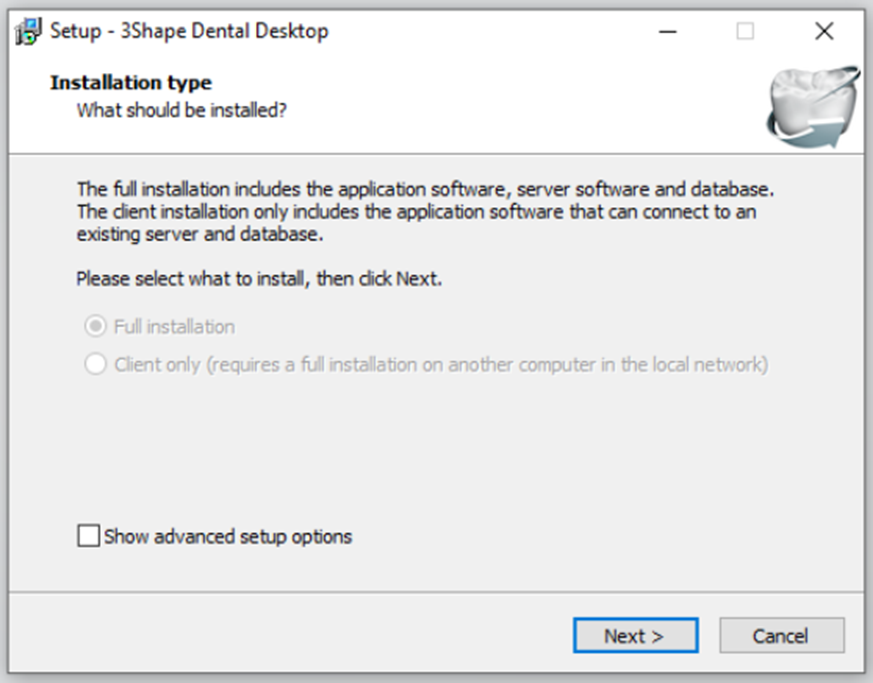
Step 8: Now it’s time to select either "Full Installation" or "Client Only".
- Select Full installation if you are only using 3Shape software on one System for example a laptop or Move System, or if this is the server PC
- Select Client Only if this is a Client PC and not the Server PC which you have already upgraded.
Once you've made the appropriate selection, click Next.
Step 11: Once the installation is complete the name of the software will change from Dental Desktop to 3Shape Unite and the user login should look different.
Step 12: Select the Administrator again and the system will start downloading the modules and installing them.
Step 13: Once this process is complete, the software should load the latest version 3Shape Unite; meaning that the Installation is complete.
Contact 3Shape Support if you have any further questions.