🎓How to apply license update in software
After each change to the dongle contents, for example after a renewal, a further dongle update needs to be performed.
There are two ways to do this.
Update the dongle from the Dongle Server Service page
Follow these steps:
Step 1: Open your web browser on a PC with your dongle inserted and navigate to http://localhost:27027.
Step 2: On the Dongle Server Service status page, select Update dongle.
Step 3: Once the update is complete, you may need to restart your software to apply the changes.


Update the dongle directly from the software
The dongle can also be updated directly from the software, especially if you are using Move+.
Follow these steps:
Step 1: Start Unite and select More.
Step 2: Select Settings.
Step 3: Select Installed Apps and Subscriptions.
Step 4: Select Subscriptions Management.
Step 5: Find the Details section and select Open.
Step 6: Select Update dongle. The dongle will search for any updates.

In Dental System it could be done from Dental System Control Panel:
Step 1: Start Dental System Control Panel.
Step 2: Go to Tools and choose Subscription Management Dongle.
Step 3. Click the “Update” button.
Step 4: Save and close Control Panel.

What is a dongle?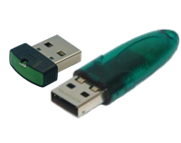
A dongle is a small USB-stick that connects to the computer and acts as a license key for the software. It ensures that only authorized users can access and use the software, protecting it from piracy.
Contact 3Shape Support if you have any further questions.
For full information on correct usage consult the official Safety and Setup Guide and the most current Manual.