How to design a retainer in Appliance Designer
07 November 2023 | Updated 20.3.2026
You can design a retainer in Appliance Designer within the Ortho System by following the steps outlined below.
- Create/choose a model set.
- Create a New Appliance.
- Choose the upper or lower jaw, right-click on it, and Create “Bar”.
- Set any component properties if needed in the pop-up window and click on “OK”.
- Perform “Setup insertion direction”.
- Define spline in the lingual side of the jaw for the required teeth.
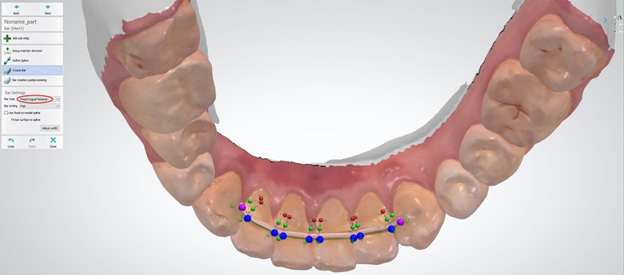
- On the “Create Bar” step choose “Fixed Lingual Retainer” as a bar Type in the Bar Settings as on the screenshot.
- Proceed with necessary adjustments if needed.
Was this article helpful?