3Shape Communicate Account cannot be authenticated
Encountering error messages during scan generation
When trying to generate a scan by using Trios Treatment Simulator, the following error messages may appear interrupting the auto-segmentation step.


This issue is caused by a missing or misconfigured 3shape communicate account on your Dental Desktop/3shape UNITE settings. As the license treatment simulator is a cloud-based app that requires an active connection with communicate to work properly.
Resolution
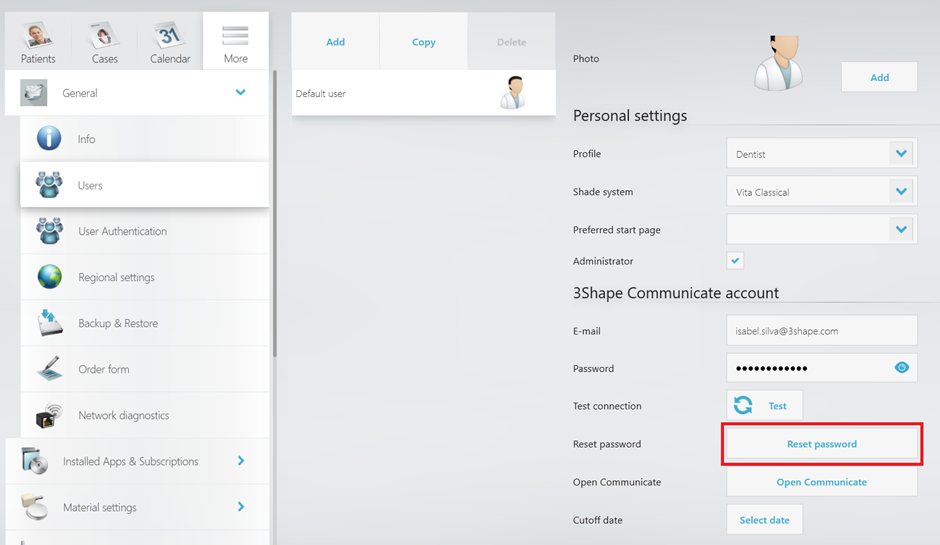
Step 1: Check if the 3shape Communicate account is configured correctly by going to the More tab, then to Settings, General, and Users.
Step 2: Try synchronizing your account by clicking on test.
Step 3: If step 2 doesn't work try removing the credentials of the communicate account from the Trios user, closing the application, and re-configuring the credentials once it is back up.
Step 4: Create a copy of the order and try using Trios Treatment Simulator again.
Step 5: If the issue persists, reset the password under the same User settings as above in Dental Desktop/3shape UNITE.
Follow the wizard on 3shape communicate account, save changes, test again, and try to generate the case one more time.
Multiple users
If you have multiple users, try with them as well to see if the same workaround needs to be applied to the other user. You can do this process by logging out and logging in again with a different account.
Contact 3shape support if you have any further questions.